A tall ship was the classroom for students in Professor Helen Rozwadowski's maritime studies class recently.
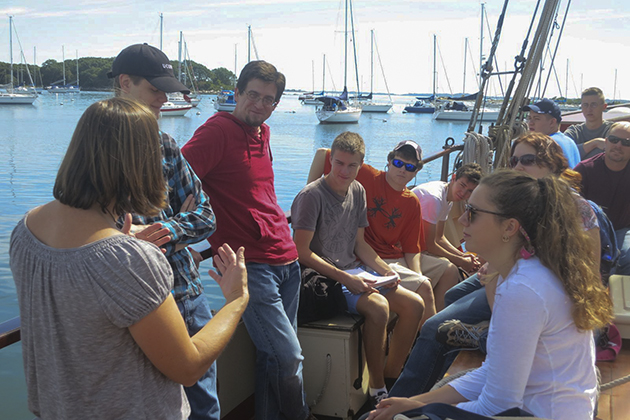
Helen Rozwadowski, left, associate professor of history and maritime studies at the Avery Point campus, explains to students on board the Mystic Whaler what the class will cover. (Nathaniel Trumbull/UConn Photo)
Helen Rozwadowski, left, associate professor of history and maritime studies at the Avery Point campus, explains to students on board the Mystic Whaler what the class will cover. (Nathaniel Trumbull/UConn Photo)
A coasting schooner named Mystic Whaler was the classroom for students taking Professor Helen Rozwadowski’s Introduction to Maritime Studies course recently.
The cruise on a tall ship is a highlight of this particular class, but Maritime Studies, an interdisciplinary, liberal arts major offered at the Avery Point campus, makes extensive use of other local resources as well, to maximize the opportunities for experiential learning. The field trips complement and enhance class readings in literature, history, geography, economics, maritime law, and other areas.
“One of the reasons I take my students on the Whaler, and also on sailing vessels at Avery Point and historical vessels at Mystic Seaport, is for them to learn how to raise and operate different kinds of sails, from modern ones to traditional square sails, so that as they read literature and maritime history, they understand,” says Rozwadowski. “They learn how to follow commands, how to coil lines, and how the hierarchy of a ship functions.”
Graduates of the program, the only one of its kind in the nation, are pursuing graduate studies in the fields of history, economics, and maritime archeology; teaching in K-12 schools; employed by environmental nonprofits; working as technicians on fisheries research vessels; and a few are even tall ship sailors.
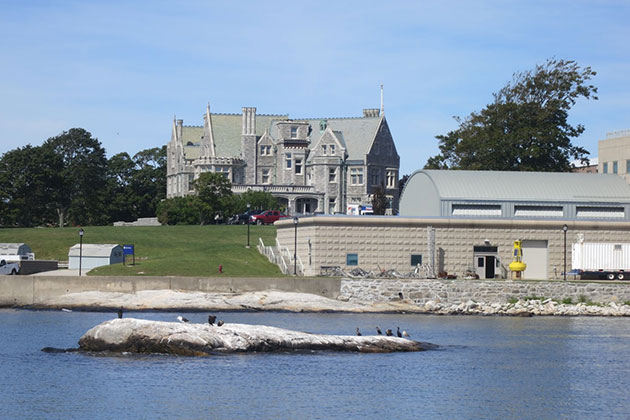
From left, maritime studies majors Dana Lewis ’15 (CLAS), Peter Wojtowicz ’17 (CLAS), and non-degree student Andrew Perkins, board the Mystic Whaler before class. (Nathaniel Trumbull/UConn Photo)Students in a Maritime Studies class take in their surroundings at the start of their cruise aboard the traditionally rigged vessel Mystic Whaler. (Nathaniel Trumbull/UConn Photo)Capt. John Eginton explains to students, including maritime studies major Caitlin Ferguson ’16 (CLAS), that schooners were like the tractor-trailers of their day, moving goods up and down the nation’s coasts before good roads were built and land transportation developed. (Nathaniel Trumbull/UConn Photo)The Mystic Whaler’s first mate (wearing a tye-die shirt) gives students instructions on how to haul up the halyard, which raises the mainsail, an activity that requires many people. She also noted that sailors always call back their instructions to be sure they heard correctly. (Nathaniel Trumbull/UConn Photo)A crew member points to features on a nautical chart of Fishers Island Sound, which includes Avery Point. Nautical charts are specialized tools used for navigation that represent lighthouses, for example, by exclamation points and list their distinguishing features. (Nathaniel Trumbull/UConn Photo)A view of Branford House at the Avery Point campus, taken from the Mystic Whaler. Avery Point is ideally situated for classes that take advantage of coastal and ocean resources, and UConn students from any campus may take the maritime studies courses offered there. (Nathaniel Trumbull/UConn Photo)A crew member demonstrates how to ‘sweat the line.’ Sweating and tailing are actions used to accomplish the last, hardest part of the job of hauling on a line. The line shown is a topping lift, which lifts the boom into position so the mainsail can be raised. (Nathaniel Trumbull/UConn Photo)Maritime studies major Bonnie Altemus ’14 (CLAS) tries her hand at the same task, with encouragement from the crew member. (Nathaniel Trumbull/UConn Photo)A crew member, right, discusses with students how to operate a schooner, explaining the tasks that need to be done and how newcomers learn from those who are more experienced. (Nathaniel Trumbull/UConn Photo)Helen Rozwadowski, associate professor of history and maritime studies (wearing a gray shirt), wraps up the class by reviewing the reading for the day and discussing how it relates to the day’s work aboard the Whaler. (Nathaniel Trumbull/UConn Photo)
Our websites may use cookies to personalize and enhance your experience. By continuing without changing your
cookie settings, you agree to this collection. For more information, please see our University Websites Privacy Notice.
What are cookies?
Web cookies (also called HTTP cookies, browser cookies, or simply cookies) are small pieces of data that websites store on your device (computer, phone, etc.) through your web browser. They are used to remember information about you and your interactions with the site.
Purpose of Cookies:
Session Management:
Keeping you logged in
Remembering items in a shopping cart
Saving language or theme preferences
Personalization:
Tailoring content or ads based on your previous activity
Tracking & Analytics:
Monitoring browsing behavior for analytics or marketing purposes
Types of Cookies:
Session Cookies:
Temporary; deleted when you close your browser
Used for things like keeping you logged in during a single session
Persistent Cookies:
Stored on your device until they expire or are manually deleted
Used for remembering login credentials, settings, etc.
First-Party Cookies:
Set by the website you're visiting directly
Third-Party Cookies:
Set by other domains (usually advertisers) embedded in the website
Commonly used for tracking across multiple sites
Authentication Cookies
Authentication cookies are a special type of web cookie used to identify and verify a user after they log in to a website or web application.
What They Do:
Once you log in to a site, the server creates an authentication cookie and sends it to your browser. This cookie:
Proves to the website that you're logged in
Prevents you from having to log in again on every page you visit
Can persist across sessions if you select "Remember me"
What's Inside an Authentication cookie?
Typically, it contains:
A unique session ID (not your actual password)
Optional metadata (e.g., expiration time, security flags)
Analytics Cookies
Analytics cookies are cookies used to collect data about how visitors interact with a website. Their primary purpose is to help website owners understand and improve user experience by analyzing things like:
How users navigate the site
Which pages are most/least visited
How long users stay on each page
What device, browser, or location the user is from
What They Track:
Some examples of data analytics cookies may collect:
Page views and time spent on pages
Click paths (how users move from page to page)
Bounce rate (users who leave without interacting)
User demographics (location, language, device)
Referring websites (how users arrived at the site)
Opt Out
Here's how you can disable cookies in common browsers:
1. Google Chrome
Open Chrome and click the three vertical dots in the top-right corner.
Go to Settings > Privacy and security > cookies and other site data.
Choose your preferred option:
Block all cookies (not recommended, can break most websites).
Block third-party cookies (can block ads and tracking cookies).
2. Mozilla Firefox
Open Firefox and click the three horizontal lines in the top-right corner.
Go to Settings > Privacy & Security.
Under the Enhanced Tracking Protection section, choose Strict to block most cookies or Custom to manually choose which cookies to block.
3. Safari
Open Safari and click Safari in the top-left corner of the screen.
Go to Preferences > Privacy.
Check Block all cookies to stop all cookies, or select options to block third-party cookies.
4. Microsoft Edge
Open Edge and click the three horizontal dots in the top-right corner.
Go to Settings > Privacy, search, and services > cookies and site permissions.
Select your cookie settings from there, including blocking all cookies or blocking third-party cookies.
5. On Mobile (iOS/Android)
For Safari on iOS: Go to Settings > Safari > Privacy & Security > Block All cookies.
For Chrome on Android: Open the app, tap the three dots, go to Settings > Privacy and security > cookies.
Be Aware:
Disabling cookies can make your online experience more difficult. Some websites may not load properly, or you may be logged out frequently. Also, certain features may not work as expected.